
How to Upgrade Adsense Hosted account to Normal Adsense account
Actually there are two type of Adsense account which Google provide us, They are Adsense Hosted account and Normal Adsense account. First of all we should know about what is Adsense Hosted account and Normal Adsense account and how they differ.
Adsense Hosted account
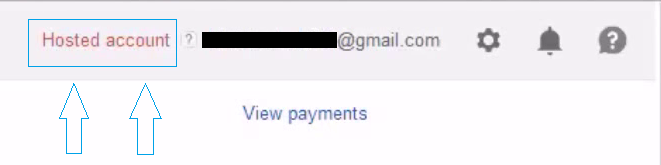
This is a type of Adsense account which you got approved from Google Hosted site such as Youtube, Blogger, or Hubpages. You can see “Hosted account” just near at your email adress of adsense
Normal Adsense account
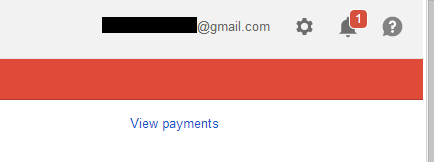
This is a type of Adsense account which you got approved for your top level domain such as like .com, .net, .org etc
Why we are heading toward Normal Adsense account from Adsense Hosted account ?
After got approved Adsense Hosted account from Google hosted site, there are too many things that we didn’t get but Normal Adsense have. Yes, Normal Adsense account is difficult to get but there are so many advantage comparing to Adsense Hosted account. Let’s know how Normal Adsense account is superior then Adsense Hosted account.
• Adsense Hosted account are easy to apply and got approved using Hosted site but they are only for Google hosted site, you can not use Hosted account ads in your Websites but From Normal Adsense account you can do it. That’s why Normal Adsense account is much better
• Easily manage your ads for your Websites from your Normal Adsense account but you can not create ads from your Adsense Hosted account.
• From Adsense Hosted account you can earn money from Youtube videos, Youtube live events but you can not earn money from your website. You can not use it in our Mobile, Windows application to earn money from it easily.
Those are some pros and cons between Adsense Hosted account and Normal Adsense account. After knowing all the fact about these two type of account I think you probably moving toward to upgrade your Adsense Hosted account if you have Hosted account.
Now we are moving toward the process of upgrading Adsense. This is not a difficult process as you expected but there are some things which you have to follow.
• First of all you need a top level domain like .com, .net, .org etc
• Quality Content With well quantity (I don’t know but it may be 50+ content)
• Make your some specific page just like: About Us, Privacy Policies, Contact Us
Visit this for more and extra details ( Things to do before applying Adsense )
Upgrade Adsense account
• Now sign in to your Adsense account.
• Click on Gear like icon which is located in right top side.
• Click on setting
• Go to Access and authorization and Site authorization
• Enter your website in “I will show ads on” box and Submit it
Or you can watch this video for visual solution (How to upgrade Adsense Hosted account)
After submit a top level domain website, you have to add the Adsense code in your respective website.
How to add the Adsense code
• Go to “My ads” tap which is appear in top menu bar
• Click on “New ad unit”, name and customize your ad unit
• Click save and get code, copy the code.
Now place your copied code in your website by going to your website admin panal<Appearance<Widgets<Header Banner. This is the best place to add and paste ad code to your website.
Or you can watch this video for visual solution (How to add Adsense ads in your website)
After implement ad code in your website, Google will manually review your Adsense application. Be patient you will get email about approval or disapproval. If your application will get approved then congratulation in Advanced. If your Adsense upgrade request has been denied don’t worry about it, try to improve your website and apply it again. If you have any confusions or any questions related this post please don’t hesitate to comment below.
