Automatically launch any crashed program on Windows
If you are a windows user then you may face the problem of software crashing or freezing frequently. If any program crashes or freezes when you are doing your task then your system might not work properly you might loose your data. We human can’t monitor each of the critical program that are running on our computers. So here I have a solution for such type of problems.
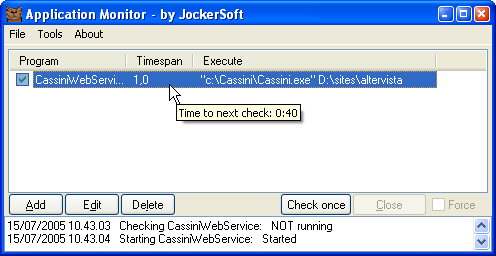
Now we have a tool called Application Monitor which will monitor all the running applications on our PC and it relaunches the program in case if it crashes or freezes. It is a portable application which will track if the applications running on our PC are running smoothly or not. If it found any application which has stopped working then it will start that application automatically. This application comes with lots of options that you can set the time interval to check the running applications yourself also you can set which programs are needed to scan continuously. Configure Application Monitor for your PC
- First of all download Application Monitor from this link.
- Install the program.
- Open Application Manager
- Now on the buttom part you can see Add, click on it.
- Select the programs that you want to be monitored by Application Manager.
- Now finally click on Create.
You are done, now your important application will be automatically monitored by Application manager. This application is Compatible with almost all version of the windows.
