
AndroidMacWindowsWindows 7Windows 8

How To Install WeChat for Pc (Windows 7/8/XP/Mac)

WeChat is a mobile text and voice messaging communication service developed by Tencent in China, first released in January 2011. The app is available on Android, iPhone, BlackBerry, Windows Phone, Symbian, and OS X. However it is not for windows/Mac PC, some Windows/Mac user are want to download WeChat on pc but it only runs on mobile platform. This feature so boring to windows/mac user. There is an alternative way to install wechat for pc via Blustacks. wechat for Pc does not exist but there is an easy way to install on your pc with bluestacks Android phone emulator. Bluestacks is a Silicon Valley-based software company that produces BlueStacks App Player and BlueStacks Cloud Connect. Both products are designed to enable Android applications to run on Windows PCs, Macintosh computers and Windows tablets.wechat 

Follow the procedure below to Install for pc

1) First of all you need to download BlueStacks on your pc. Download BlueStacks from its own official site (www.bluestacks.com) and install it. Bluestacks allows you to install Android apps on your pc as if it were an Android device and gives you the full functionality of Wechat for free on your pc.

2) Now you need to download wechat for pc. You can find wechat app file after searching on search engine. Just download and install it. However once you have installed bluestacks, you can find and install wechat through bluestacks. For installing through Bluestacks follow the few steps bellow
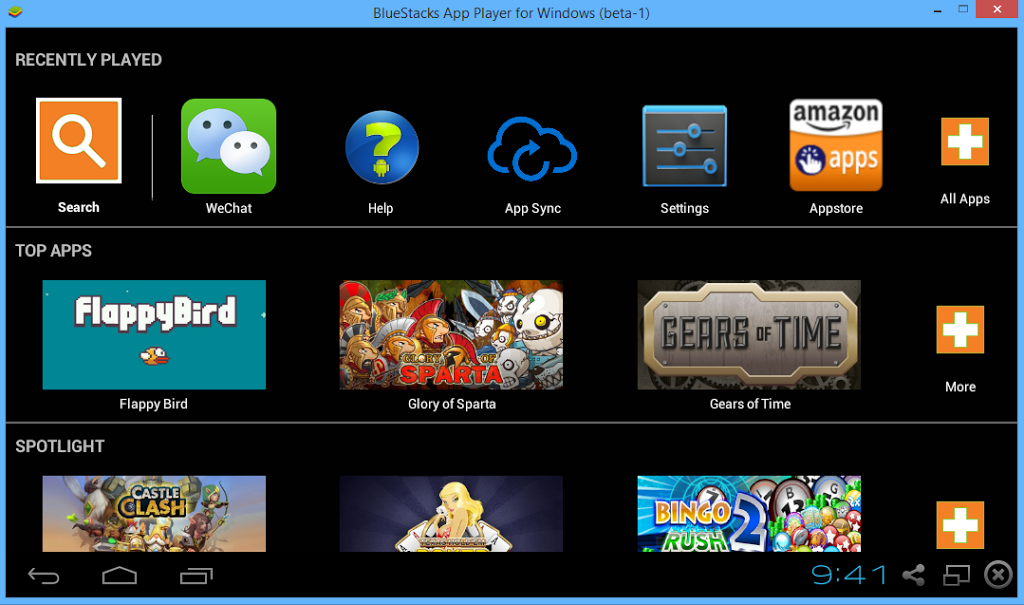
bluestacks

• Open Bluestacks and go to the Search field.

• Type “WeChat” in this field. • Once you see the application, click on the install button.

• After you click on the install button, the application will start downloading.

• The installation starts automatically once the downloading finishes.

• Once the installation is done, you are ready to go.

Ashok Khatri

He is the founder and author of this blog. He is an engineering (computer) student and work as a web and application based programmer. He is a technology writer and all-around computer geek and He writes a blog about technology tips & tech troubleshoot. You can add him to your circles on , follow his updates on or add him on .